Blog

Getting into the Teaching Groove

I decided over the summer that I wanted to teach on 3D and games related courses at some point in my life, and this idea was reinforced by my love of helping people all throughout this year, I really like to share my knowledge where possible as I think shared knowledge is good knowledge and sometimes the best advice can come from a peer who has experienced similar issues. As well as this, a Tech Artist needs to know how to mentor their team in a new pipeline or tool.

I’ve been volunteering recently to do classes on Friday afternoons, mainly specializing in step by step processes and highly technical skills which are industry standard, such as photogrammetry and looking more into Zbrush. I also, over the course of the games simulation module provided specific one to one advice to my fellow students, helping them with anything from direction ideas to helping to overcome major problems with their game I’ve taken great enjoyment in this and I really feel it’s helped step up my confidence and reduce my anxiety of standing up in front of a class, albeit a small one to help them in getting a better understanding, I also think it’s helped me to gain a better bond with my peers over the course of the past few weeks as well, as I at least hope sharing my own knowledge has pinpointed to them that I can be approached with questions at any point, and one to one advice can be initiated and they may find this less intimidating than approaching a tutor for help as can be the case, even though Nico is friendly enough.

One point that was brought up recently is my foul language, while I like to retain a relaxed and laid back attitude, I agree that foul language is unprofessional and I’m hoping to curtail this for tomorrow’s session, which I’m expecting to be highly intense, so I will also need to look at pacing and making my points clear for all of the class. I think noting down chronological points and some sort of plan will be beneficial, even if it’s just for my own reference.

I also need to find myself a clothing base mesh on my drive to use and demonstrate how it is obtained using traditional 3D techniques.
VRTGO Labs event… Take away thoughts

I went to a networking event today which discussed VR in Training and Education, and while it wasn’t really something I was looking at it’s given me some things to take away, from it given that I want to eventually become a teacher later down the line. And also keeping up with and anticipating new directions artists may need to take is important to the role of tech artist.

VR and games technology is being explored as a new technique of learning, with significant advantages over the simple classroom and textbook paradigm, the one major advantage is it’s fun, for kids, teens and adults alike, entertainment mixed with learning, that isn’t some kind of cheesy TV show (looking at you, Veggietales)

Another significant advantage I had rolling around in my head was that it bridges the significant gaps between visual, auditory and tactile learning that is very prominent in the classroom teaching style of today; for example you can now teach maths in a kinesthaetic manner much more safely and much more accessibly through the use of VR applications as opposed to classroom materials, and this will greatly benefit the engagement of children and the job of the teacher as much as it will benefit a company’s profits.

It’s also interesting to note that it can be used for behaviour modification, showing people the consequences of certain actions within a safe environment and showing them why certain things are how they are, in VR, there’s a sense of anonymity, you can destroy a virtual company, but it’s virtual, so it’s all good, it’s easier to learn from these mistakes in a controlled environment than it is in the big wide world.

It would also be interesting to see if VR can play a role in psychological applications, such as CBT and Rehabilitation from drug usage or Post Traumatic Stress Disorder, helping people to better understand their thought patterns, their feelings, and helping them to acknowledge the bigger picture of a situation and take a more offhand and logical approach to a situation. In the case of PTSD, it could also come to great benefit in the sufferer knowing and coming to terms with what has happened to them, and to help them alleviate suppressed memories similar to how Eye movement desensitization and reprocessing works but perhaps more effective in treating it head on.

All in all, it’s good to see that gaming technology such as VR is taking more of a hold within society and it is being seen as a useful bridge to bridge the gaps in education and training as much as it has a large entertainment factor

The issues stated of non-computer savvy learners within their respective industries is, I think, a generational issue that will cease to exist in the next 20 or so years.

Also something to take into account is level design may need to be changed and looked at from a different perspective, with the massive increase in interactivity yielded by VR, level design will need to reflect this, and alongside this,the game needs to be optimized to run at a stable 90 frames per second to avoid motion sickness or other issues.

I also spoke with a Gateshead college tutor and former Ubisoft employee, he was rather helpful in advising me on my current position and affirmed to me that I was on the right track to enter the industry, as I am entering in a similar way that he did, which is reassuring to know.

(Trying) To Survive Maya pt. 2

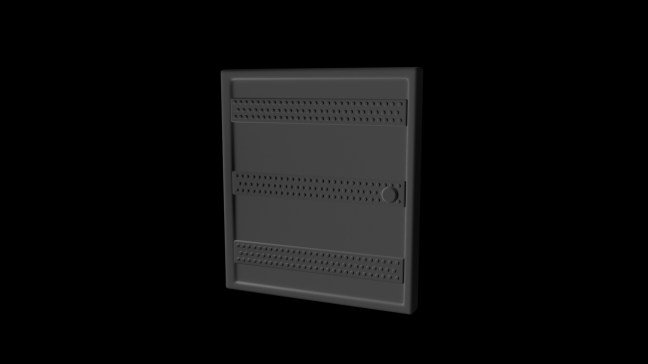
So I downloaded Maya 2016 onto my home PC and I’m already starting to feel more comfortable with it. but the one thing I have realized is Maya is very much the go-to tool for animators, rather than modelers, which explains why Max has so much more in terms of modelling capability, where Maya seems to lack in that compartment. I’d very much like to try getting into animating and rigging with Maya; something to possibly approach my tutor with, as he’s more experienced in this than I am.

maya_door A simple door, modelled in about 10 minutes in Maya 2016.

Maya 2016’s modelling toolkit seems more fleshed out than previous versions, and it feels more familiar to me as a Max user, it’s very similar to the modifier rollout, just with less in it.

I think with time I can start to get to know Maya further, and use it to its primary strength, which is animating, while using Max to model with. Both pieces of software are by the same developers, and as a result cross compatibility between the two is a given.

(Trying) To Survive Maya

Okay, so, I’d like to say I’m fairly proficient with 3DSmax, after 4 or so years of using it almost daily. So When the opportunity arose to try out Maya in structured lessons, I wasn’t going to say no, knowing that 3DSmax’s younger sister is a useful piece of software to know for the industry.

Knowing both pieces of software inside and out would make me a more desirable candidate in the industry should I want to make my career there, and modelling practices between the two generally stay the same, with the interface changing.

I’d toyed with Maya very briefly in the past, using it as a bridge-point between 3dsMax and Mudbox, as Mudbox had some issues with 3dsMax at the time. however that was way back when I was starting out in Max and could barely make a building, things have changed, I’m more proficient in the workflow, and I use Zbrush now, instead of Mudbox, as Mudbox had a horrible issue with wanting the models to be perfect and complained about the smallest issue, whereas Zbrush really doesn’t care so long as there is geometry there.

I really think over this past two weeks, Maya and I have gotten off to a bad start, there’s always been a horrible problem on campus that I get a little brain fogged, and can’t really focus. Not to mention I’m not able to customize the software to the way I want it, I know with my several Max versions at home, I have several plugins and tools (like RapidTools) that greatly help with my workflow, and make me a more efficient modeller with cleaner geometry to hand.
The same can’t be said with the college computers, to no fault of anyone, they’re all networked, not personalized, and customization of the software through plugins, no matter how useful, is forbidden. So I can keep setting the custom toolbar all I like in maya, but as soon as I log off the computer, it’s all reset and nothing’s permanent. Kind of difficult to get on the right page, if the network sets you back to page 1 every time.
Another problem I’ve found is the terminology of it is, as I say to my tutor ‘so backwards’ Bevel in Maya is Chamfer in Max, and Maya’s extrude does inset, bevel, and extrude all in one, whereas Max has different buttons for all three, and I’m used to the different buttons and CORRECT terminology.
Maya has no geometry constraint options, and things that Max has had since version 3, are missing in Maya. So it’s been kind of hard to transition from one to the other, knowing that the one is a gutted out, less intuitive version of the other.

So as of the time I’m writing this, I’m installing it onto my home PC, and looking for some tools and plugins that can help me feel more at home with Maya, and make the transition from my old friend Max a little less painful.

I keep telling myself, if I can learn the disastrous interface that is Zbrush, I can learn Maya, I’ll keep pushing on with Maya, and hope that I can get something interesting with it eventually.

Evaluation: Character Design

So I got my character design module marks back on Friday (2/12/2016) And I was really pleased with the mark, I was kind of holding my breath hoping I hadn’t missed out anything important that would’ve knocked me down.
68% for what I put in was a fair mark I’d say, and the comments Paul has made, I can agree with, namely the Character Boards not being up to scratch, they underwent a last-minute change, and as a result weren’t in receipt of much critique from the get-go as to what could be improved. So I’d say the final boards were indeed a let-down to the rest of the project, which I’d put a lot of thought and time into, and it’s something I can definitely work on Improving; managing my time and communication so that the final presentation is as good as it can be, without putting anything down.

One thing I disagreed with slightly is that the models produced were industry standard, while it was an amazing compliment to receive and I was intently grateful to hear it, since learning a thing or two since I handed the project in, I realized that there were a couple of fatal flaws that meant she was not up to scratch, and would’ve come under intense scrutiny by the industry and audience alike if they knew their stuff. I’d already learned at the point of writing this, why getting realistic wrinkles on clothes is important for the project. and I hope to continue to refine this new technique, as it appears to be working well so far.

One major thing I want to look at is poly modelling hair, I feel Zbrush can be useful with this, but I want to see if there is a way of refining my technique further to create better looking hair, but for this game’s time, and this setting, the hair I have isn’t too bad.


Strengths:
firm backstory writing
Understanding and usage of 3D to design a character

Weaknesses:
Character Board Creation
Character proportions
Imagination

Threats
Time
lack of a dedicated tutor made communication slightly more difficult

Opportunities:
There are tutorials online that I can look at for character design.

Targets:
-Ensure the final piece does not suffer a lower quality as experimentation takes place
-Open dialogue with tutors to ensure I’m working on track and to a good standard
-Continue to learn and refine new Zbrush techniques