So as I’ve been progressing with Marvelous Designer, and seeing as I’ve been pretty into the latest installment of Ghost Recon recently, I thought i’d try to deconstruct their character workflow.
One good skill to have as any kind of artist is the skill of breaking down another artist’s work. Not copying it exactly, but understanding what they did and how they did it. which is what I aim to do here as part of a major project.
This aids growth of myself as an artist, and also forces me to extend my knowledge of new software.
Firstly, The work I was producing before this was this level:
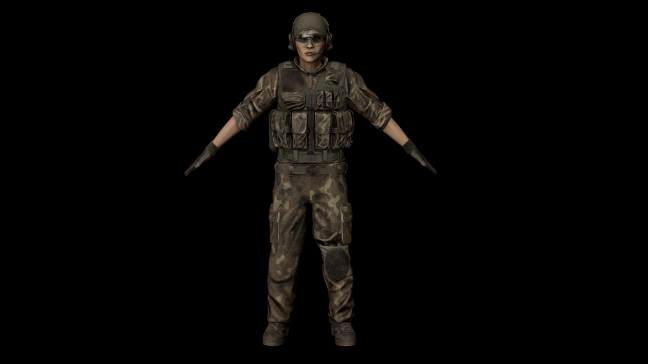
And that is what I need to aim to beat.
An in-Depth Look at the characters ingame
So first of all I need to look at how they did it, no point in doing something now if I don’t know what specifically I need to aim to do.
One of the first things I noticed was the jagged wrinkle lines on some of the clothing, this normally indicates to me that it’s gone through clothing simulation software and touched very little by other software, as normally wrinkles coming out of Zbrush are smooth, almost to the the point where they look artificial.
Another point of note was the incredibly high mesh detail, if I was to hazard a guess, I would say an entire character model in the customization menu is likely upside of 100K verts.
for the mesh to work well Ingame, this would need some serious LOD work.
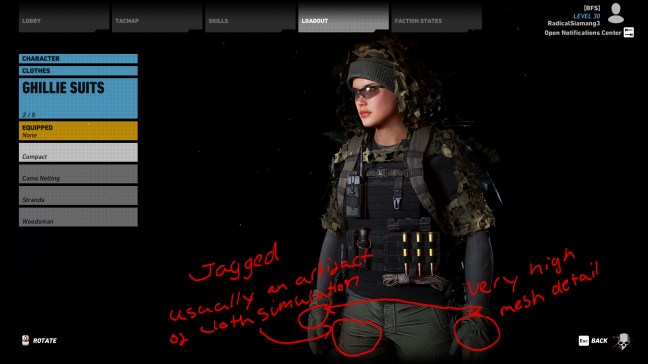
Ubisoft has been stated as a user of Marvlous Designer, and for their AAA works like Ghost Recon Wildlands, which has a number of different customization options, it’s safe to assume that, in the essence of time, they used Marvelous Designer to quickly create and simulate clothing, requiring much less time in software before it is visually appropriate and be placed into the game
The textures look like a mix between Quixel Suite and Substance painter, the fading patterns look similar to substance painter masks, but the fabric looks scan-based a la Quixel, I am willing to bet that due to colour customization, Quixel is probably the more likely candidate due to its PSD output as standard, however substance painter is more reliable software. I would imagine, though, it was down to the individual preference of the texture artist.
The MOLLE on the vest is 2D unless a greeble (i.e the bullets) has been added there, then the MOLLE goes over the top of it, a great optimization technique that maintains visual appeal.
While Photogrammetry is becoming an industry standard, my gut feeling is that the head models have been sculpted from a common base mesh to maintain consistency, the textures have likely been done in either Mari thanks to its ability to mimic colour from a photo or substance painter thanks to its stability, speed and ability to automatically process subsurface scattering maps. Skin shaders are industry standard, so I will need to look at creating a visually correct subdermal map and use it appropriately.
 Zee's Cave